The RAO Synergies Tool provides information about both the disease and the organization representing the disease area. All information is straight from patient organizations themselves—and is intended to help rare disease patient organizations learn, share and collaborate.
This tool allows users to search for commonalities by keyword or by using a wide variety of filters, including clinical and organization features.
Methodology
Each organization represented in the tool completed a questionnaire. Responses were gathered into a database, which feeds this tool. An example of the survey can be found here. Information will be updated annually.
List of Filters
Clinical Filters: these filters relate to the clinical aspects of rare disease
- Disease class
- Body systems
- Organs
- Known Genetic Link
- Causative Genes
- Contributory Genes
- Type of inheritance
- Newborn Screening
- Disease Mechanism(s)
- Age of Onset
- Average Age at Diagnosis
- Life Expectancy
- Affected Sex(es)
- National Prevalence
- Global Prevalence
- National Incidence (Per 100,000)
- Global Incidence (Per 100,000)
- Methods of Diagnosis
- Populations and/or Ancestry with Higher Prevalence
- Symptoms/Phenotypes
- Biomarkers
- Existing therapies
- Therapies in Development
- Therapeutic Development Stages
- Therapeutic Development Role
Organization and Research Filters: these filters relate to the rare disease organizations’ infrastructure as well as their research-enabling efforts
- Cell line, type
- Cell line, involvement
- Cell line (institution, location)
- Cell line, share
- Disease model, type
- Disease model involvement
- Disease model location
- Disease model, share
- Organizational Challenges
- Clinical trial involvement
- Clinical trial role
- Clinical trial types
- Biobank
- Biobank, involvement
- Biobank, location
- Center of Excellence, involvement
- Center of Excellence, location
- Registry
- Natural History Study
- Data collected for registry and/or natural history study
- FDA Patient Listening Session
- FDA PFDD
- ICD Codes
- Diagnostic guidelines
- Clinical guidelines
- Organizational Roles
- Scientific Advisory Board (SAB) policies and whether you share them
- Clinical Research Network (CRN) policies and whether you share them
- Research Roadmap and whether you share it
- International chapters: divisions of your organization in other countries
- International partners: separate organizations in other countries with which you partner
- Other international research initiatives
How to use this tool
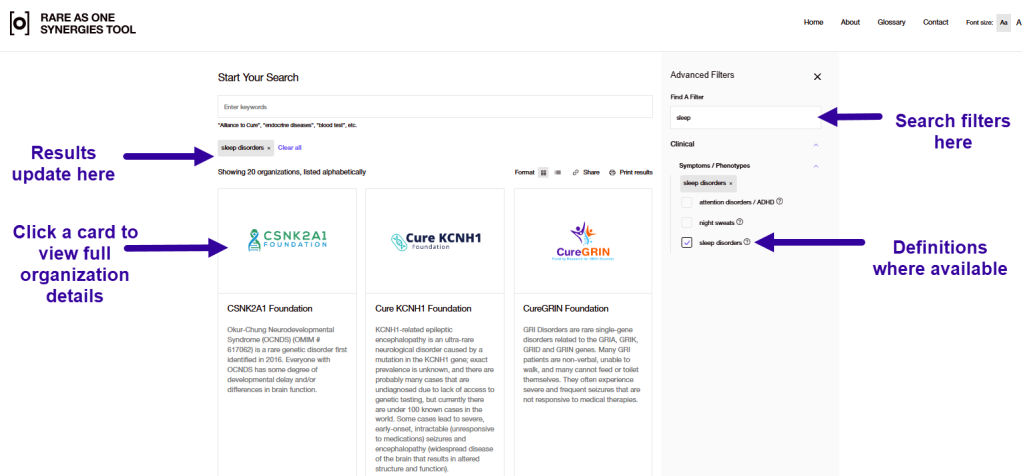
When you first arrive on the main page, you will see a list of participating organizations, and a large search bar labeled “Start Your Search” at the top. You can browse to an organization of interest, start a keyword search in the search bar, or pop open the “Show Advanced Filters” menu on the right side and search or scroll and select filters in that list. As you select filters, the list of organizations will change to reflect those that match the filters.
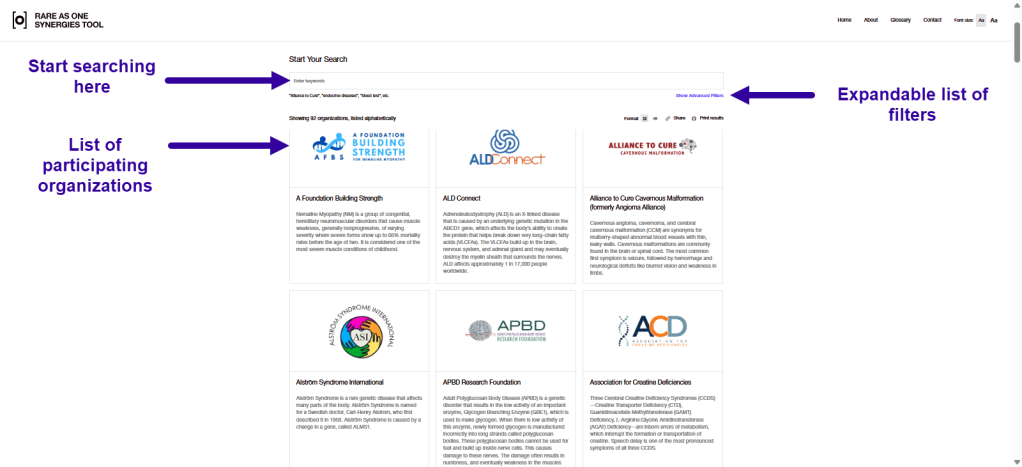
If you perform a keyword search, the results can be sorted alphabetically (default) or by relevance. The keyword search queries all the descriptions and metadata for each organization, and when sorted by relevance, the organizations with the most keyword matches are shown first. Results from the Advanced Filter search are shown only alphabetically, as a filter search is a 1:1 match (that is, the organizations in the results match that single filter).
Selected filters will also display definitions or synonyms; for example, if you type “nosebleed” in the search, the filter will locate the symptom “epistaxis”. Any filter with a question mark symbol next to it has a definition available to view by clicking the question mark to open the definition. For symptoms in particular, only those symptoms reported in the survey are included. For genes, both the definition of the gene and a link to the expression of the gene in CZI’s CELLxGENE tool are included. Please note that by clicking this link, you will leave this website and enter the CELLxGENE website, which has its own privacy policy. You can view CELLxGENE’s privacy policy here.
Some of the responses to the questionnaire were codified in order to help users find more areas of synergy. For instance, in cell lines and disease models, we coded by type of cell or animal model, rather than the specific line, so users can more easily find organizations working with iPSCs or zebrafish. However, users can see the full free text responses from the questionnaire on each organization’s Detail Page.
The following sources were used for the filter definitions when possible and coding of responses when needed:
- Disease class: Orphanet
- Genes: Genecards
- Body systems: Wikipedia
- Types of inheritance: NHS Genomics Education, and NCBI: Understanding Genetics
- Symptoms: Human Phenotype Ontology, MedLine Plus, Orphanet, and Monarch Initiative
- Biomarkers: NCBI: Biomarkers definitions and their applications
- Cell lines: EMBL-EBI Ontology Lookup Service
Currently, filters are combined using “AND” boolean logic; “OR” and “NOT” filters are not possible at this time. For example, if you filter by selecting a symptom or symptoms and an organ, the results will show you organizations that have both that symptom AND involve that organ.
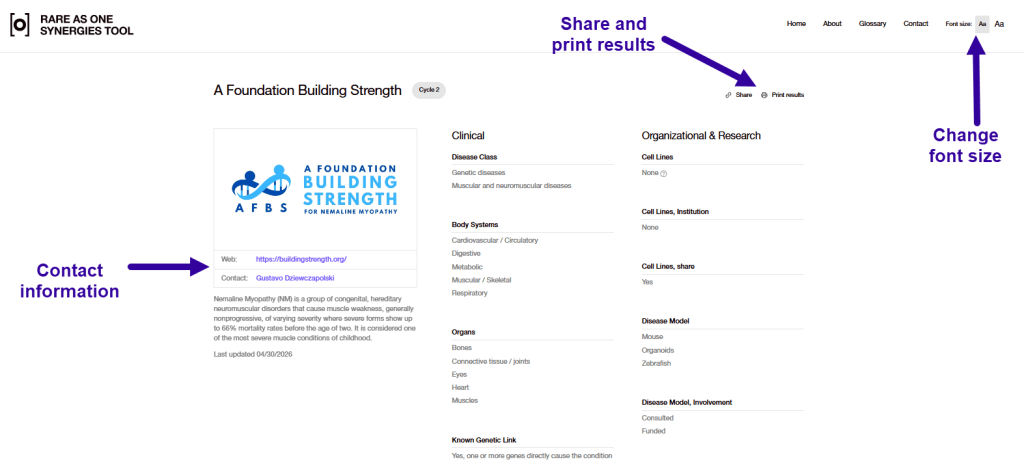
Click on a resulting organization to see that organization’s complete answers to the survey on their Details Page. Definition prompts appear next to the terms using the sample question mark icon from the filtering step. Contact information for each organization is included where available, so you can reach out to organizations you may be interested in learning from or partnering with.
You can print your results using the print button or share your results using the share button. The share button will give you a link to copy and paste for sharing purposes. Please do not share outside of your organization.
For visual accessibility, this tool has a button to enlarge the font size in the upper right corner. It is also compatible with “dark mode” settings on your Windows or Mac systems.
Frequently asked questions
Please complete this form. Responses to survey questions will be updated annually. Other corrections will be evaluated on a case-by-case basis.
Please complete this form. Responses to survey questions will be updated annually. Earlier addition of data will be decided on a case-by-case basis.
Send an email to privacy@biohub.org. In the email, please provide us with your name, the country (and state if within the United States) in which you live, which of the privacy rights you would like to exercise (see the full Privacy Policy for these rights), and sufficient information that allows us to reasonably verify that you are the person about whom we collected personal information. If you would like an authorized agent to make a request for you, have that agent email privacy@biohub.org with the above information along with additional information sufficient for us to verify that the authorized agent is acting on your behalf. Please also let us know if you have questions or concerns related to exercising any rights you have under applicable law to control your personal data.
Please complete this form.
Currently participation in this tool is limited to Science in Society/Rare As One grantees. If you would like to be added, please complete this form. Surveys are distributed annually.
The data is stored on Biohub’s servers and analyzed and aggregated by the RAO and tech teams, and accessed by the RAO team and affiliated technology team as well as by current and former RAO grantees.
The RAO Synergies Tool is currently intended for Biohub’s Translational Impact & Engagement/Rare As One grantees. It is hosted on a public website, meaning no login is required to access it and others will be able to see the information provided on the website. However, it is an unlisted website, meaning that it won’t be included in search engine results.
You can print your search results and you can share the URL of your results with other team members.
For the purposes of helping users to find synergies, we did code some of the responses. For instance, in cell lines and disease models, we coded by type of cell or animal model, rather than the specific line, so users can more easily find organizations working with iPSCs or zebrafish.